
How to schedule an advising appointment in SAGE
1. Go to sage.uga.edu and log in with your UGA credentials.

2. Click on your advisor's name from the list of your connections.

3. On the left-hand side, click "schedule appointment."

4. Use the drop-down menu on the right-hand side.

5. Choose from the options in regards to what you need help with.

6. Review the dates and times that your advisor is available.
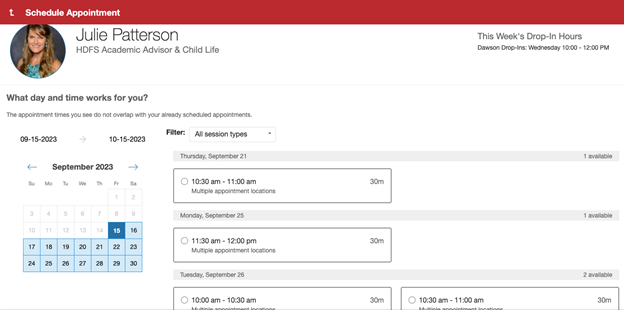
If you do not see any available appointment times, try expanding the date range you are searching.
If you still do not see any available appointment times, search your UGA email for information about advising appointments from your advisor. Some advisors may only release their appointments one or two weeks at a time.
If you are still not able to find any information about advising appointments, please email your advisor.
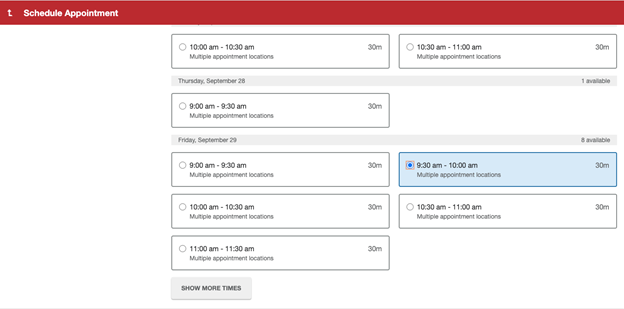
7. Select your desired time depending on your advisor's availability.
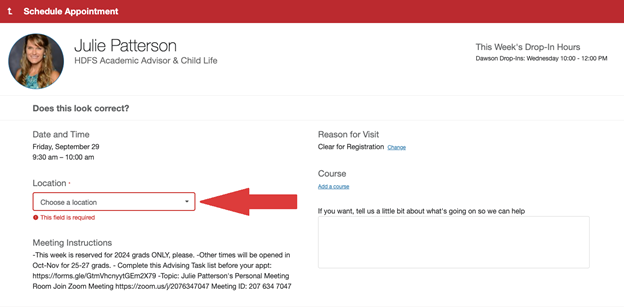
8. Use the drop-down menu to select your desired location for your appointment.
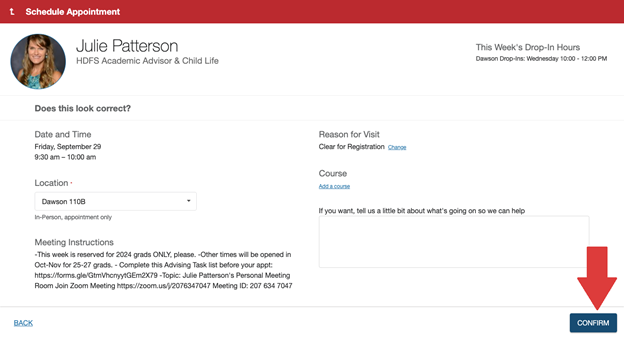
9. Click "Confirm" in the bottom right-hand corner.
10. Make sure you received a confirmation email for your advising appointment.